Ergonomic AI posture check from your own camera
Runs in your browser. Nothing is uploaded.
- Put the camera to your side. Phone or webcam at about chest height, 1.5 to 2 m (5 to 6 ft) away.
- Press start, then sit as you normally work. Hands on the keyboard, eyes on the screen.
- Hold still for three seconds. Then see what your posture analysis finds and what you can adjust.
The first run loads the AI posture engine, about 12 MB.
Camera blocked
One thing to adjust
Not a medical evaluation. This AI posture check gives general information for adjusting your sitting posture and desk setup. Its estimates can be wrong and are not a substitute for a qualified ergonomist, physiotherapist or doctor.
Common questions
What do I need to run it?
A phone, or any webcam you can move to your side, and any modern browser. The first run downloads the pose engine and model, about 12 MB. Your browser usually keeps them, so later checks start faster.
Is it free?
Yes. Your results show up right away, without asking for your email or an account.
How accurate is it?
A 2024 study comparing MediaPipe, the pose model behind this check, with laboratory motion capture found elbow and knee angles agreeing to within about 10 percent.
The camera being tilted, too high, or not truly to your side can also shift every angle by a few degrees, and loose clothing or hair moves the detected points. Treat the numbers as good to within a few degrees, and treat the direction of each finding as the useful part.
It is also a posture snapshot, not a full workstation evaluation. It does not see your screen, keyboard, chair or desk, so it infers those from how you sit.
What it measures
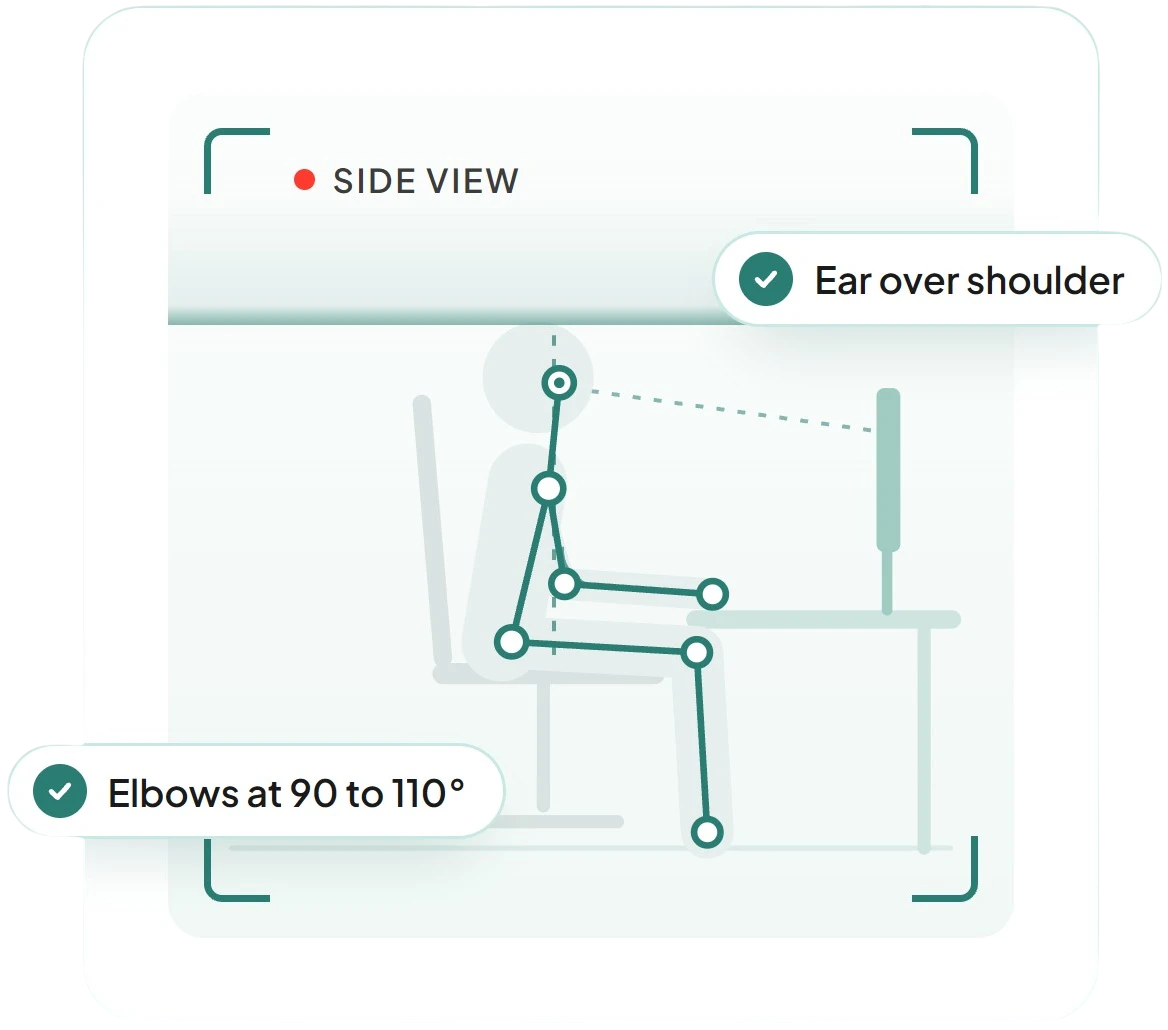
An ergonomist looks at you from the side first, and so does this posture analyzer. In a three-second scan, it maps 33 points on your body and evaluates your posture.
Neck
How far your head sits ahead of your shoulder point. This is the number people mean by tech neck.
ComfortableUp to 12° ahead
Back
How far you lean in or recline, against the slightly reclined backrest the guidelines ask for.
Comfortable25° reclined to 6° forward
Arms
The elbow angle and whether your forearms are level, which is really a question about desk and chair height.
Comfortable85 to 120°, forearms level
Legs
The knee angle, when your legs are in view. Knees riding above the hips point at a chair set low.
Comfortable85 to 120° at the knee
Each measurement is compared to guidance from OSHA and Cornell University, and the results come back as an AI ergonomic assessment with simple changes to try.
Method and sources
The page runs Google’s MediaPipe pose landmarker. From the side that faces the camera it measures five things and compares each to a comfortable optimal range. Over the three-second screen it takes the middle value of every frame, which smooths out jitter.
How each angle is measured
- Neck
- The angle between straight up and the line from your shoulder to your ear, so 0° means your ear sits directly above your shoulder, and the number grows as your head moves forward. Up to 12° counts as good, up to 22° as a tweak, beyond that as adjust. Clinicians measure forward head posture with the craniovertebral angle, taken from horizontal at the base of the neck, where about 47 to 50° is typical and lower means the head sits further forward (reference values, 2025). A camera can’t find that point under clothing, so the check uses the shoulder instead. Roughly, 12° here sits near the clinical 50°.
- Head tilt
- The line from your ear to the outer corner of your eye, against horizontal, with about 6° allowed for the natural shape of the face. Within 10° of level is good. This is the tilt of the head, not where the eyes point. The guidance is that the head stays level and forward facing while the eyes look 15 to 20° down at the middle of the screen, which is why the top of the screen belongs at about eye level. When the head itself tilts down, the screen is usually lower than that.
- Back
- The angle between vertical and the line from your hip to your shoulder. Anything from 25° of recline to 6° of forward lean is good. Cornell’s guideline puts the best seated posture at a 100 to 110° recline, OSHA’s reclined reference posture runs to 120°, and CCOHS asks for the head to stay aligned with the spine.
- Arms
- The angle at the elbow between upper arm and forearm, plus the slope of the forearm. 85 to 120° with level forearms is good. OSHA: elbows bent 90 to 120°, forearms roughly parallel to the floor. CCOHS: elbows around 90°.
- Legs
- The angle at the knee, only when your legs are in view. 85 to 120° is good. CCOHS: hips, knees and ankles at 90° or slightly more.
Sources
For people who perform at a desk
Neck stiff by 3pm. Back aching after a long session. Monitor probably too low.
Most people sitting at a computer all day know their setup isn’t quite right, and just live with it. But good posture is part of how you work and perform. A quick online ergonomic assessment flags what’s going on, instead of leaving you to guess.
Office and remote workers
Kitchen table office? A posture evaluation shows what it’s costing your neck.
Gamers
Long sessions stack up. Check your gaming posture during play.
Content creators
You already own the camera. Turn it on your posture for once.
Students
High school and university is a lot of sitting. Good desk posture makes it easier.
Privacy
- Frames are measured directly on your phone or computer.
- ErgoAssessment receives no images, no video and no results.
- No account or email required.
The more I delved into ergonomics through running a desk setup shop, the more I noticed there is no easy way to tell if your posture is good or bad. Professional assessments start at $115/hr, and educating yourself with videos and blogs can be more confusing than helpful.
So I built ErgoAssessment (formerly ErgoCam), a lighter option you can do at home in a few minutes. I’m not an ergonomist, and this isn’t a replacement for one, as AI makes mistakes. But I think it can be useful, and the posture evaluation works off published ergonomic guidance.
Questions or feedback are welcome (and needed): georgi@ergoassessment.cam

Worth tracking your progress?
Pick a time and I will send one reminder to run the posture checker again.